Seller market reports, done in one click

Get the listing.
Keep the listing.

One place for the whole life of a listing. The presentation that wins the seller. The launch that announces the home. And the market report they get every week until it sells — comps, showings, buyer feedback, photo analysis and the finished email, in one click.

Try the demo with no account and no card • Runs in your browser, inside your own MLS access • Your MLS password never passes through us
Just Listed flyer built by MarketPulse — hero photo, price banner, listing facts, and agent contact block Area market snapshot infographic — days on market, sale pace, and price ranges around the listing Social captions — ready-to-post captions written from the listing's data

The flyer • the report • the snapshot • the captions • the sign-in sheet.
All built by the app, all carrying your name. See them up close ↓

The report

What lands in your seller's inbox.

Not a newsletter. Not a ZIP-code stat sheet. A market analysis of their home, in your voice, with every number pulled live the morning you send it.

You
You — from your own inbox
to your seller
Your market update — 15 Hillcrest Dr

Hi Sarah — here's where things stand this week.

We've had 4 showings this week and 19 since going live — the average active listing nearby is seeing about 2 a week.

1512 Bluff View Ct — new on the market
2,180 sqft • $415,000 • updated kitchen, similar palette to yours
308 Meadow Run — went under contract
2,020 sqft • listed $409,900 • 31 days on market
“Buyers loved the layout — they felt the price was a touch high for the finish level.” — showing feedback, buyer's agent

The homes that closed near you this year averaged $402,300 after 38 days on market. I'll call this week to talk through what that means for us.

— You

  • Live, not recycled
    Showings from the showing service you already use, comps from your own MLS access — pulled the moment the report runs, never a canned area stat.
  • AI that reads the photos
    Every comp's photos are compared against your seller's home — finishes, palette, condition — and described in plain sentences you can edit.
  • Buyer agents, verbatim
    Real showing feedback, quoted word for word — and you read every email before it goes, so what reaches your seller is always your call. The market delivers the hard message so you don't have to.
  • Averages that match the list
    The closed averages are recomputed from the exact homes shown above them, every time. One wrong comp costs a seller's trust — so the math is never approximate.
  • Your name on everything
    No vendor logo, no “powered by,” sent from your own address. Set it up once and every report goes out under your name — working smarter, not harder.

Get the listing. Keep the listing.

One platform for the whole life of the listing.

Most agents have nothing to put in front of a seller between listing day and closing day. That gap is where listings are lost — and where they're won. MarketPulse arms all three moments that decide it.

At the table
Win the listing.
Every agent at that table makes promises. You put a report on it: “This is what you'll receive from me every week until your home sells.” One click builds the full report with your name on it — print it, hand it over. Anyone can make that promise. This one keeps itself.
In the box: Presentation Sampleinteractive presentationpricing briefpre-listing packetseller homeworkpresentation deckseller net sheet • first report lands about a week after the sign goes up
Week one
Launch the listing.
The moment it hits the MLS, the app builds the listing's own launch kit from its real data and photos — print-ready, post-ready, and branded to you and only you.
Day 60
Keep the listing.
A listing that sits is a relationship at risk. Every week the seller hears nothing, they get closer to interviewing another agent. The report changes that math: they see the showings, the comps, the feedback — and what you're doing about it. Informed sellers stay to the close — and a seller who never has to chase you for an update spends that energy telling friends and family instead. That's where the next listing comes from.
In the box: the full report, due every week • listing timeline • work log • Where We Stand price memoappraiser packet • due-list tracking • change-over-change diffs
$10–12k
the commission on one kept $400k listing — the number every report is protecting

Straight out of the app

This could have your name on it.

Not a mockup and not a template. Every piece below was built by the app itself, one click each, from a single sample listing — the same build that runs on yours. The only thing that changes for you is whose name is on it, and whose listing it is. Ours is on none of it, ever.

The report email
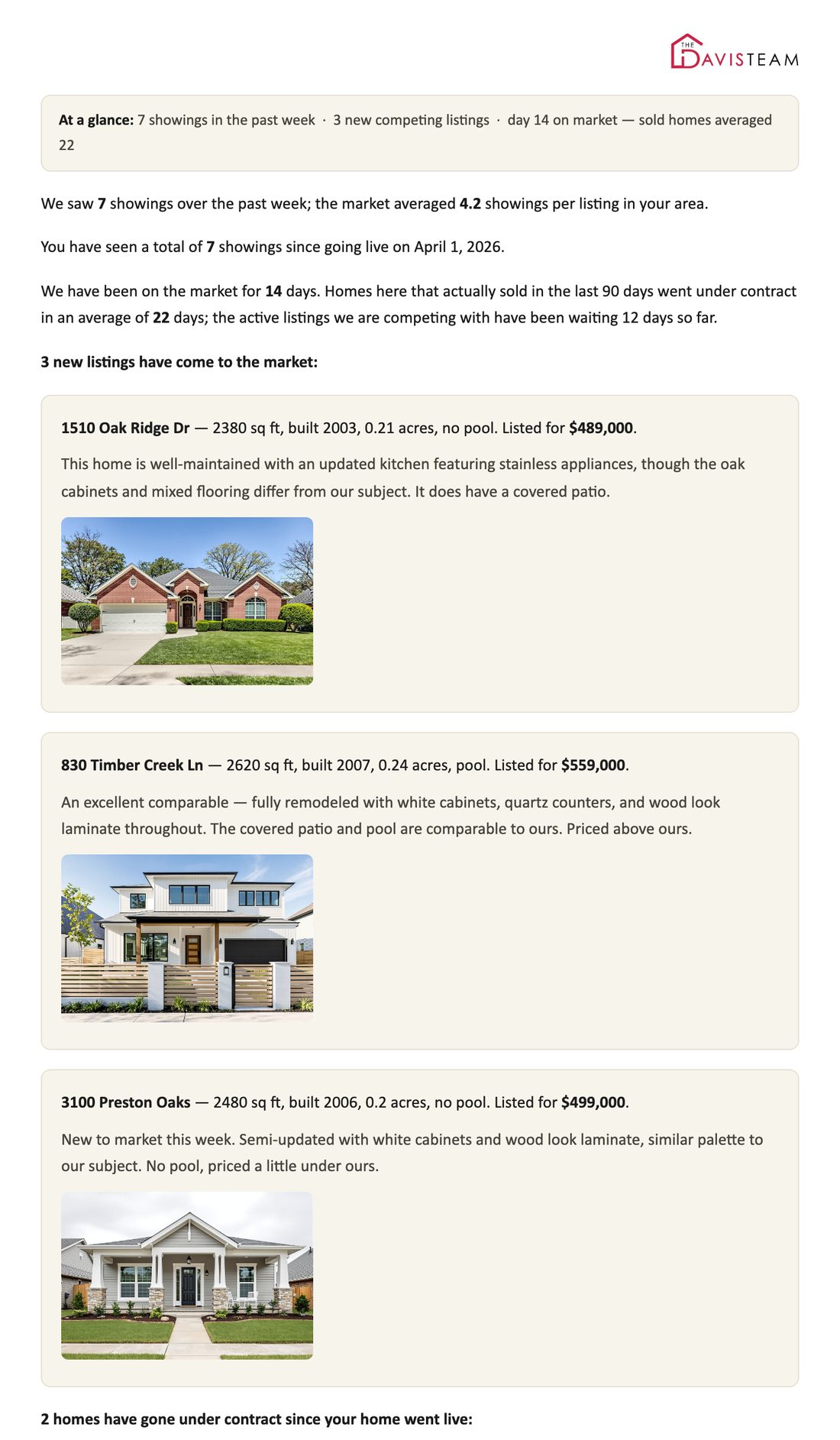
What your seller gets every week. Showings against the market. Every comp with photos and a plain description. Buyer-agent feedback in their own words. And sold averages that match the exact homes listed right above them.
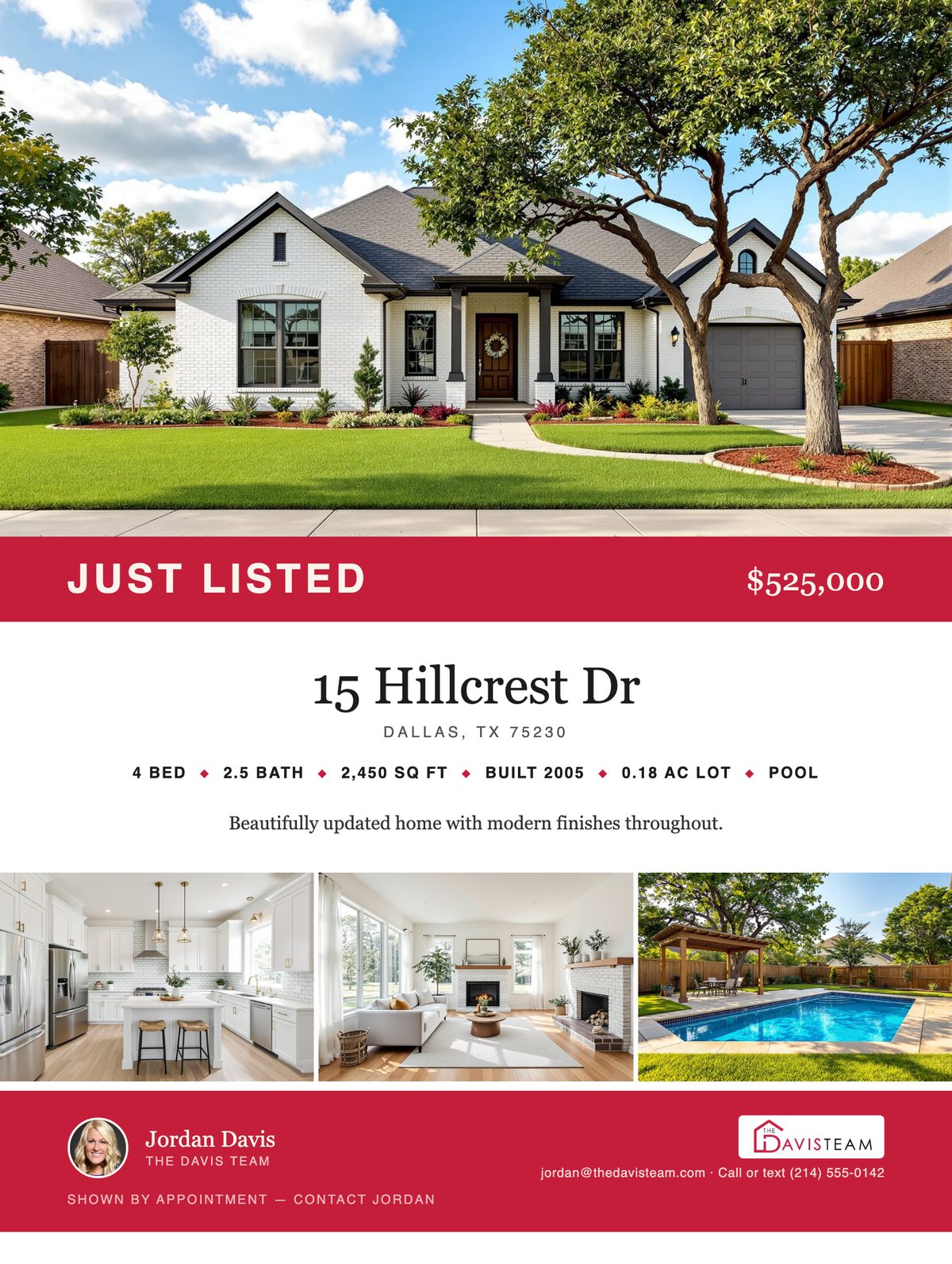
Print-ready Just Listed flyer — hero photo, price banner, listing facts strip, MLS description, photo strip, and agent contact block
The listing flyer
Print-ready the day the sign goes up — hero photo, price, the facts, your MLS description, your contact block. No designer, no Canva night, no vendor logo in the corner.
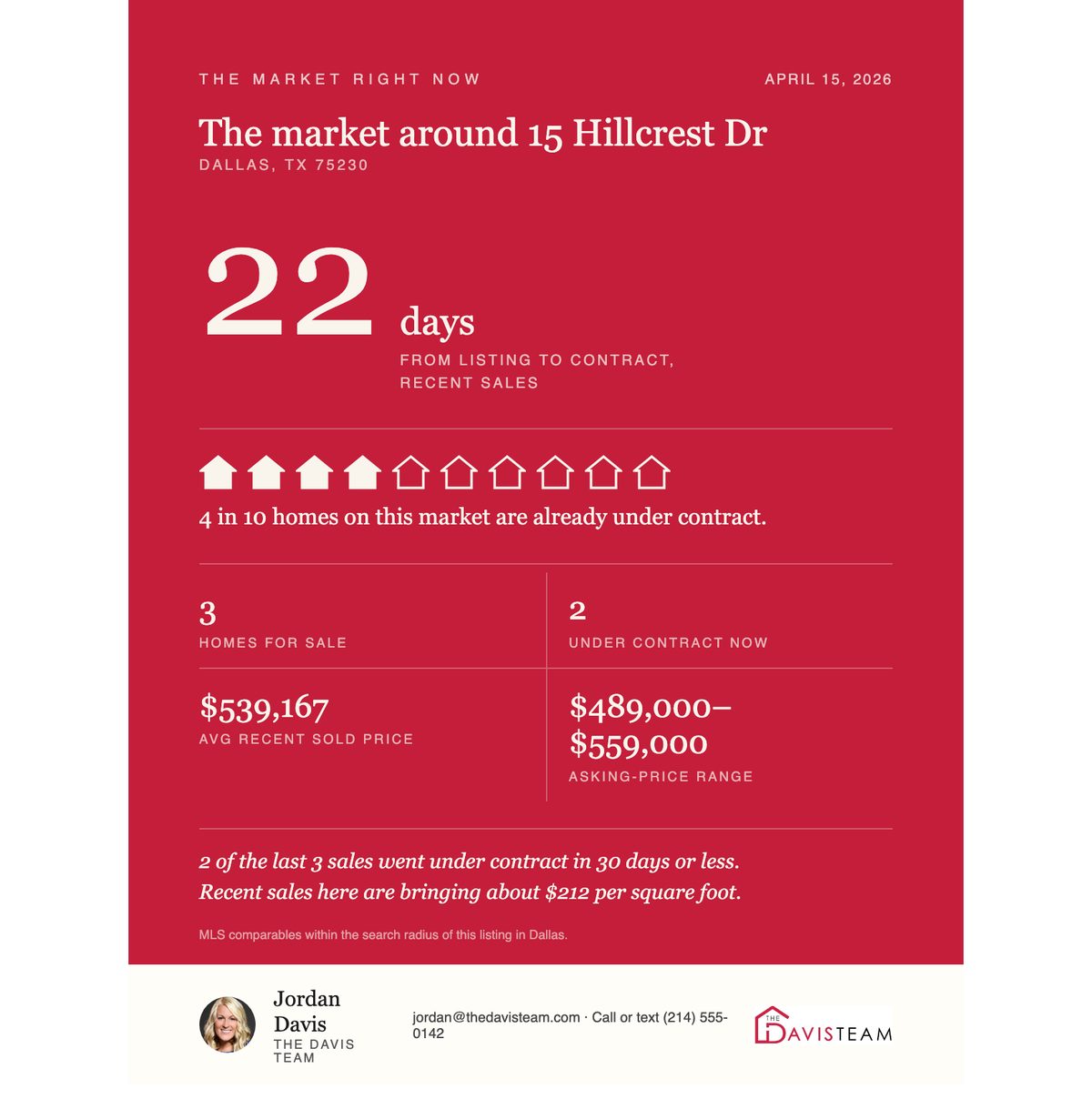
Area market snapshot — average days from listing to contract, sale pace out of ten homes, and price ranges, computed from the report's own comp pull
The area market snapshot
The market around the listing, computed from the same comp pull the report trusts — counts, averages, and pace, never a neighbor's address. Sized for a post or the sign-in table.
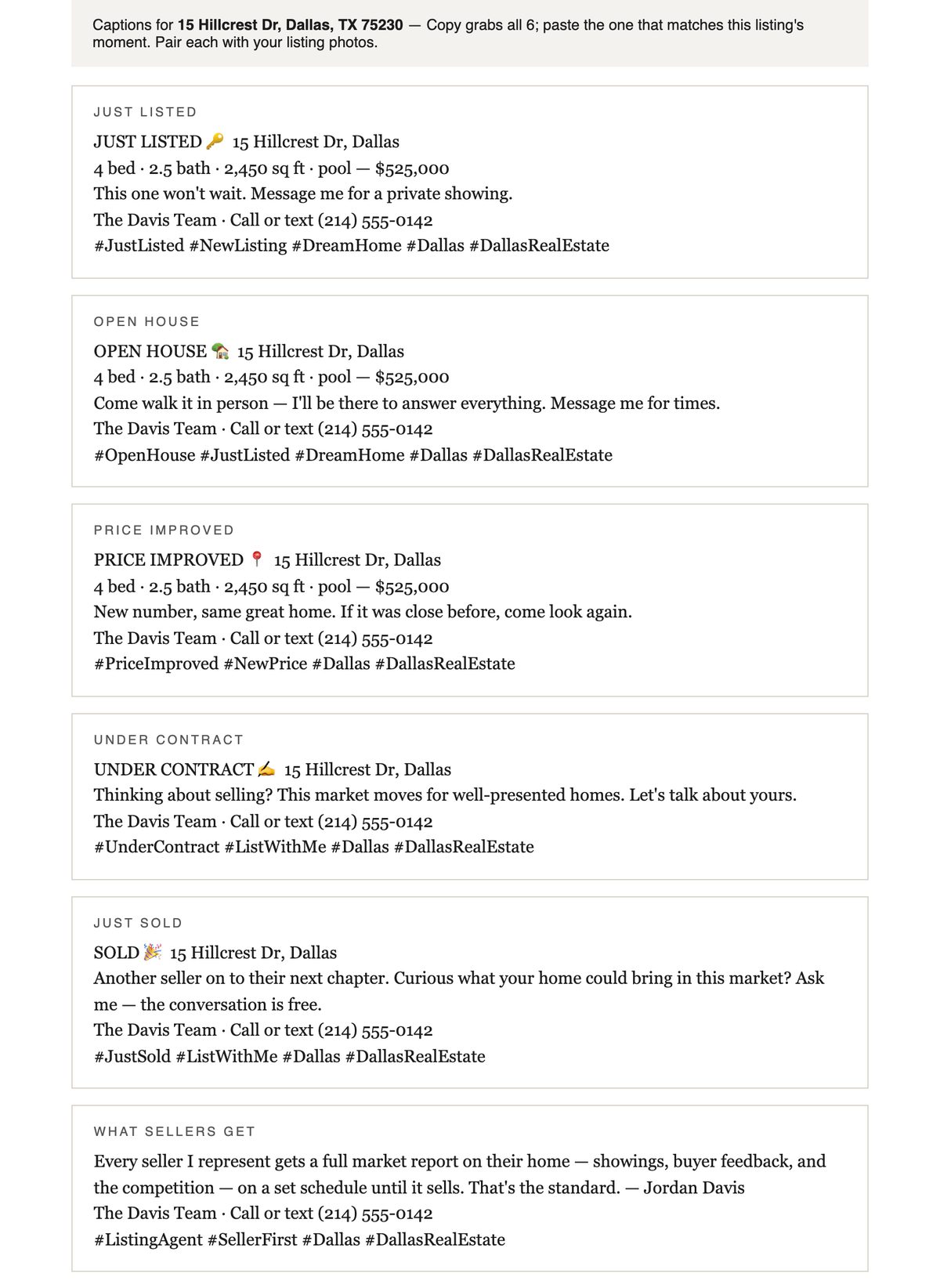
Social caption pack — four ready-to-post captions with lifecycle-aware hashtags, written from the listing's data
The caption pack
Ready-to-post captions written from the listing's own data, hashtags matched to where it actually stands — copy, paste, post.
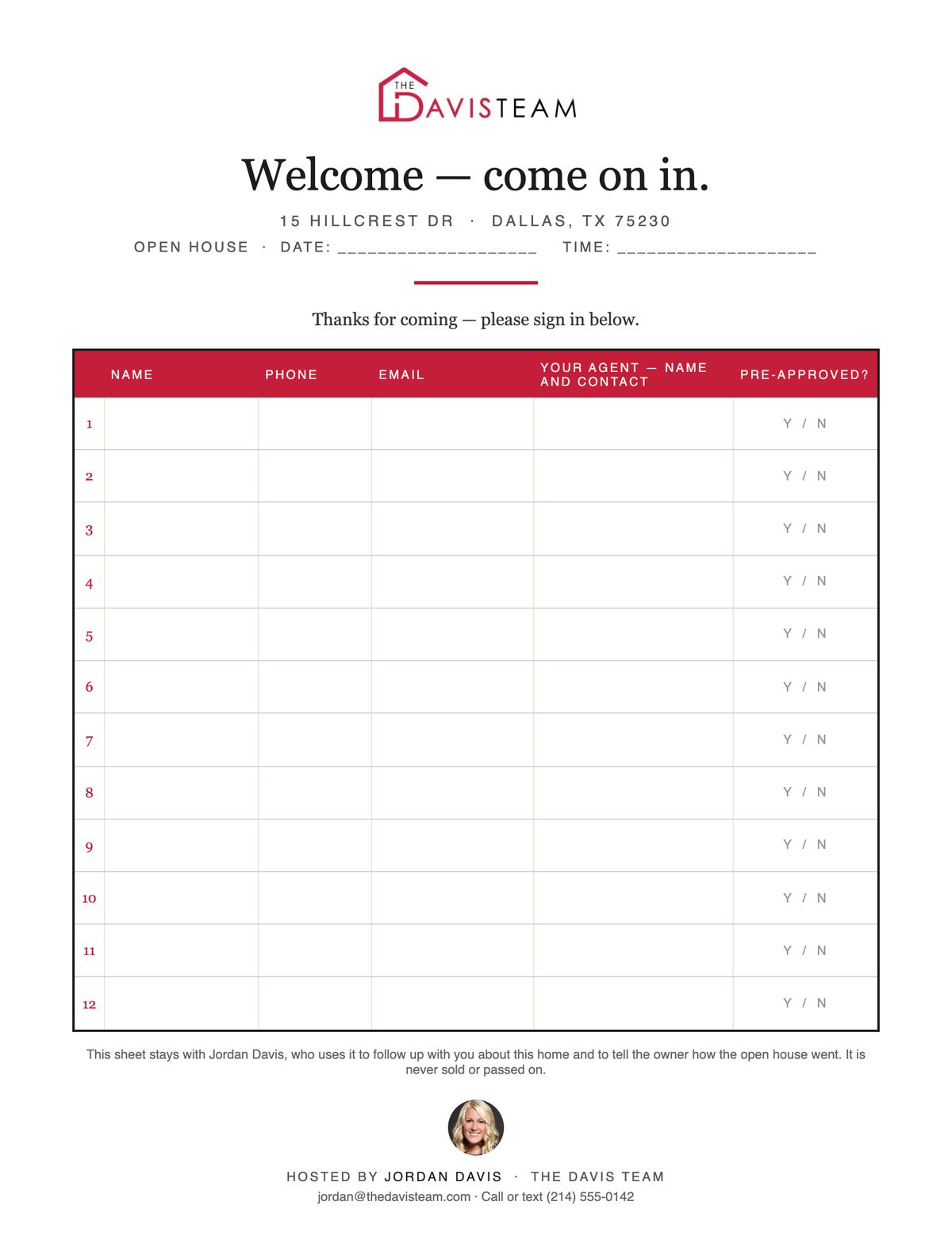
Open house sign-in sheet — name, phone, email, and working-with-an-agent columns, with the agent's privacy line
The sign-in sheet
A clean letter-size sheet for the open house — because the sign-in table is a branding surface too, and yours shouldn't be a legal pad.
See it with your name on it.

Put in your name and your team, and the full sample set rebrands to you on the spot — the report, the flyer, the packet, all of it. It is the same swap the app does for a paying agent, so what you see is what you would send.

Takes you straight to the sample kit, branded. Nothing is installed and nothing is charged.

Built from sample data by the app itself — not a design team, not a template site. Read the full sample reports to see everything the email says.

The problem

You already know this takes too long.

Every week somebody has to sit down and do the same thing, and for most agents that somebody is you. Log into the MLS. Run the search. Open every comp and scroll every photo, judging each one. Switch to the showing service, pull the showings, take out your own, copy the feedback. Do the math. Then write the whole email by hand. For every listing. Every time. On a busy week it slips — the seller hears nothing, and quiet sellers start taking other agents' calls.

  • × Cross-referencing MLS and your showing platform by hand — tab after tab after tab
  • × Scrolling through hundreds of photos to judge flooring, cabinets, bathrooms, and paint colors
  • × Fighting broken filters and platform quirks just to get basic showing data
  • × Counting confirmed showings, leaving out your own, tracking feedback by hand
  • × Writing the same email structure over and over, filling in numbers by hand
37+ minutes
per listing, per report — and that's if nothing goes wrong

The fix

One click. Real report. Your voice.

MarketPulse does the whole thing for you, start to finish — from your already-signed-in MLS tab to a finished email. You review the AI's comp picks, change anything you want, and hit send. The email reads like you wrote it, because it uses your exact template and your exact words. This runs through the MarketPulse browser extension, now rolling out to accounts.

1
Pick the listing, or type the address. Click Run.
That's the only input. Everything else is automated.
5 seconds of your time
2
MarketPulse does the pulling.
Rides the MLS tab you're already signed into, runs the comp search, saves the photos, reads each listing's details. Then your showing platform: every showing, every piece of buyer-agent feedback, plus the market's pace where your showing platform publishes it. The same screens you would open by hand, opened for you.
~4 minutes, automated
3
AI vision analyzes every photo.
Builds a visual fingerprint of your listing — color palette, flooring, cabinets, bathroom style. Then compares every comp against it. Flags seashell sinks, earth tones, dated fixtures. Recommends include or exclude with reasoning you can read.
~2 minutes, AI-powered
4
You review. You decide. You send.
A review screen shows every comp with the AI's assessment. Toggle any decision. Edit any description. When you're satisfied, hit Generate — the app produces a complete seller email with showing counts, market stats, new comp descriptions, and feedback. Copy, paste into whatever email you use, done.
Your call — 2 minutes

Everything included

If a listing needs it, it's in here.

Not eight marquee features — the complete inventory. One subscription, everything below, nothing sold separately.

Win the listing
Before the seller signs
Presentation Samplethe full report built with your name and branding in one click — print it, put it on the table Interactive listing presentationthe whole appointment on one screen, branded to you — the market numbers already filled in from the real pull, and the only blanks left are the seller’s own answers, typed in while you talk. Prints, or runs off an iPad with no signal Pricing briefa suggested range computed from what closed homes actually brought per square foot — the evidence by address, the method stated on the page Pre-listing packetbranded cover, the pricing brief, your marketing plan on your real schedule, your testimonials — the piece that goes on the table Seller homeworkthe workbook they fill in before you go live — why they loved the house, in their own words, and every upgrade with the year and what it cost. Their answers write the listing copy; the upgrades page goes to the appraiser months later Presentation deckthe packet as landscape slides — present from a screen or print to letter landscape, same numbers as the brief Seller net sheet ↗what the seller walks away with — sale price to one big number, and what a price move really costs at closing Buyer tour sheeta printed showing-day sheet with numbered stops and rating rows — today's buyer is next year's seller Homeowner market updatestay in front of past clients: what the market around their home is doing — totals and averages only, never other homes' addresses or photos First report in week onethe listing is live and the seller wants to hear from you. The first report comes due about seven days after go-live, so whatever you promised at the table happens on time. Sellers want more from you, not less A schedule you setweekly by default, or any interval you choose — tracked per listing until it sells
Keep the listing
Every week until it sells
MLS comp pullradius search on the subject, live from your own MLS access — sqft, year, price, DOM, pool, descriptions AI photo analysisevery comp scored against your listing's kitchens, baths, flooring, palette — with written reasoning Showings & buyer feedbackconfirmed showings and verbatim buyer-agent feedback from your showings service What-changed trackingnew listings, price drops, and status changes since the last report — found automatically Market snapshot sectionevery active, pending, and closed comp by address, with averages recomputed from that exact list — including what they brought per square foot Listing timelineevery report delivered and every piece of logged work on one dated page — proof the work never stopped Work loglog an open house or a photo refresh in one line — it shows up in the seller's next report and on the timeline automatically Where We Stand ↗the price conversation on one page — showings, days, buyer feedback, and a verdict the arithmetic chose, not you Appraiser packet ↗a neutral data sheet for the appraisal appointment — nearest sales first, your improvement notes, no value suggested Price-position linean optional sentence stating exactly where the asking price sits against closed $/sqft — off by default, on when you're ready for that conversation The finished emailwritten in your voice from your template, photos embedded — copy, paste, send from your own inbox Review screenevery comp, the AI's reasoning, and a toggle — you always have final say before anything is sent Batch runs“Run All Due” works the whole book in one sitting; each email still gets your read before it goes Step-by-step modewatch every phase with the real extracted data — see exactly what the app is doing, gate by gate

Who this is for

Built for whoever does this work. Usually that is you.

On your own
Every seller hears from you every week.
You are the whole operation. The report that used to eat an evening now takes a click, and it goes out under your name, in your words, whether you had the time that week or not.
On a team
Give your best person the hours back.
Whoever does this today — you, an assistant, whoever runs the office — gets those hours back. Every seller on the book hears from the team every week, like clockwork. That consistency keeps listings from walking, and promising it at the table wins the next one.
Running a brokerage
Every agent sends the same professional report.
Each agent runs it under their own name, in their own words, with your broker line on every piece. Priced per agent, with a brokerage rate at ten or more, so the newest agent in the office sends the same report as the top producer.

One price — get the listing, keep the listing

$49 a month per agent. Unlimited reports.

Per agent, per month
$49/agent/mo
Unlimited reports. Every listing, every week, until it sells.
$49 a month for one agent
  • Unlimited reports — no per-report charges, no cap
  • Full MLS + showing platform automation (rolling out with the extension)
  • AI photo analysis on every comp — included, nothing to set up, AI fees never billed to you separately (rolling out with the extension)
  • Email generation with embedded photos (rolling out with the extension)
  • The finished email, ready to paste into your own inbox (rolling out with the extension)
  • Comp review screen with AI reasoning (rolling out with the extension)
  • Report history + change tracking (fills in as reports run)
  • Presentation sample + full listing launch kit
  • Runs in your browser — nothing to install beyond the extension itself
Get Started — $49/mo

Add or remove agents any time. No contracts. Cancel anytime. Brokerages with ten or more agents: ask about brokerage pricing. By subscribing you agree to the Terms and Privacy Policy. See a sample report before you buy.
One listing — won or kept — pays for years of MarketPulse.

Questions

Before you ask.

That's half the point. One click builds your sample report, with your name on it. Now you can put a promise on the table no other agent can match: “You'll get this from me every week until your home sells.” Win the listing and the launch kit is already there: a flyer, an open-house sign-in sheet, social captions, and a market snapshot you can share. All of it built from the listing's own data. Grab a sample report to see what the seller sees.
Yes. Reports are built from your own signed-in MLS session — the same screens you search by hand — so there is no data feed to buy and no password to hand over. If yours is not connected yet, say the word and we will connect it. We turn those around fast.
Yes — that's exactly why MarketPulse runs on your side, not on a server somewhere. The extension works inside your own browser on your office network, so your showing platform sees the IP it already trusts. No VPN, no workarounds needed.
Because you're already signed in. The extension rides the browser where your MLS session and showings service already live. No second login, no stored MLS password, nothing to install beyond the extension itself. It works in any Chromium-based browser: Chrome, Edge, Brave, Arc, and Opera. Firefox is planned; Safari isn't supported.
All of them. Your showings and your buyer-agent feedback come from whatever service your office already uses, and you never leave it to get them. If yours is not connected yet, ask — we add one quickly.
Your MarketPulse password is kept only as a salted hash we cannot read back. Your MLS and showing-service passwords never come to us at all. The extension never asks for them. It works in the browser tabs you sign into yourself, so there is nothing for us to hold. The app sends us four things. A check that your subscription is active. A report id and a count, so we can bill you. The cost of the AI calls it made. And the listing photos and details it asks our AI to grade, for the comps and for your seller's own home. It never sends your passwords, your seller's name or contact details, or the listing address. The one exception is texting. If you choose to text a seller from the app, that message and their mobile number pass through our texting service to be delivered. We do not keep either.
The app shows each comp's photos to an AI and asks how that home compares to your seller's: the kitchen, the floors, the bathrooms, the colors, and problems like dated fixtures. The AI is included and runs on our account. Nothing to sign up for, no key to manage, no surprise bills. Your subscription covers it.
Absolutely. The review screen shows every comp with the AI's assessment and a text field for each description. Change any of it. Keep a comp the app dropped, drop one it kept. You have the final say.
As many as you need. Every listing, every week, for every agent on your plan. There is no report cap and no per-report charge, so a busy month costs the same as a quiet one.
Per agent. Each agent who runs reports is one seat at $49 a month, and a team of three pays $147. Add or remove agents any time; the change is prorated on your next invoice. Brokerages with ten or more agents get a lower rate — email support@commandmodule.com and we will set it up.
Tony Eggleston built it, still writes the code, answers the support email and picks up the phone at (817) 516-4400. That matters here more than it usually does, because every report goes out under your name and not ours. Read who he is and why he built this.

Nothing to install beyond the extension

It runs in your browser.

One address, any computer. Sign in and your dashboard is there. No download, no setup disc, no call to IT.

  1. Sign in with your email and password.Set a password once, then sign in anywhere — your office computer, your laptop, or both.
  2. Add the MarketPulse extension.One click adds it to the browser you already use, where your MLS and your showings service are signed in. It finds your dashboard by itself. Nothing to set up, and it never asks for a password. Rolling out to accounts now.
  3. Run your reports.The extension does the pulling in a tab next to yours. You review the comps, and the finished email lands in your dashboard, ready to copy.
What you get
  • Your dashboard and every listing tool, the day you sign up
  • Who's Due, report history and Your Team, from any computer
  • The seller report itself, through the extension. Rolling out to accounts now.
Chrome Edge Brave Arc Opera Firefox — planned Safari — not supported
Works in any Chromium-based browser. Your MLS and showing-service passwords never pass through us. The extension uses the tabs you're already signed into.

Get the listing. Keep the listing.
Keep the commission.

A promise few agents make at the table, kept in one click every week until the home sells. See what MarketPulse sends.

See Sample Reports